QoS Class Identifiers (QCIs) play a role in the implementation of prioritization procedures on LTE networks.
I’m aware of two publicly available options for finding QCI information about a cellular connection. Specialized apps are required. One option requires a rooted device. The second option requires app sideloading. I don’t recommend rooting, sideloading, or using these apps without a solid understanding of the security concerns involved.
With either approach, make sure you’re looking at the QCIs associated with regular data use (if you see a QCI of 5, you’re likely looking at the priority of IMS signaling rather than regular data use).
#1: Network Signal Guru
The app Network Signal Guru (NSG) exposes QCI information, but the QCI-related features only work on rooted Android devices with appropriate Qualcomm chipsets.1
When NSG is running, users can scroll through a number of screens with network performance metrics. If you’re connected to an LTE network, one of the screens will be titled “EUTRA Sessions.” The screenshot below comes from a test I ran using Google Fi’s service over T-Mobile’s network:
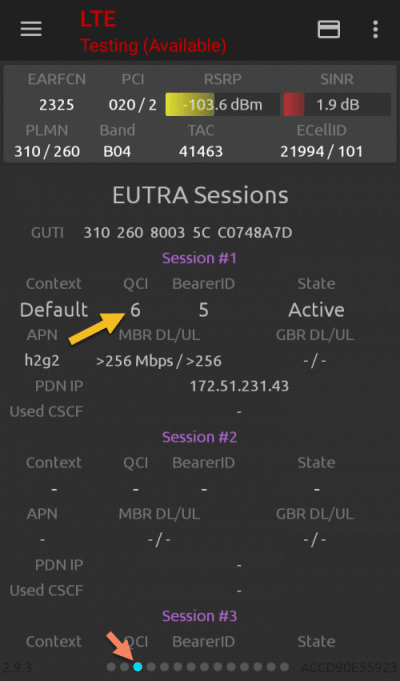
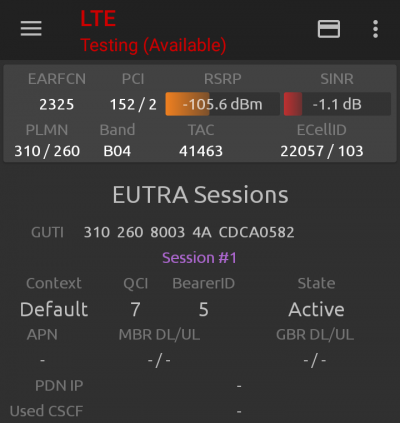
My Google Fi service had a QCI of 6 during regular data use. I also ran a test with service from Mint Mobile (an MVNO that uses T-Mobile’s network). During my test, Mint Mobile had a QCI of 7.
#2: Pixel BandInfo + Shizuku
On many recent Pixel devices, QCI information may be pulled without regular rooting using Pixel BandInfo. The app must be sideloaded and I’m unsure of the exact Pixel models it supports (some additional compatibility info is available on Reddit). The app only works in conjunction with Shizuku, a second app. Shizuku can be used to give specific apps some root-like privileges. Depending on your version of Android, Shizuku may also require sideloading.
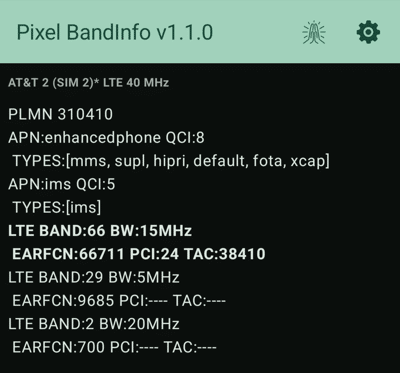
Once Pixel BandInfo is running with the appropriate permissions, QCI values are easy to find. The screenshot below shows a QCI of 8 found for regular data use on AT&T’s Extra 2.0 plan:
Priority and QCI
To contextualize a given QCI result, you’ll need to know about the QCIs for other services using the same network. A QCI of 7 on one network may not indicate the same level of priority that the same QCI value indicates on another. I maintain a list of QCI information you can use for that purpose.
My understanding of networks’ prioritization policies combines information from QCI tests and disclosures published by carriers. If you’re interested in sharing your QCI test results, please let me know.